TinyImage feature
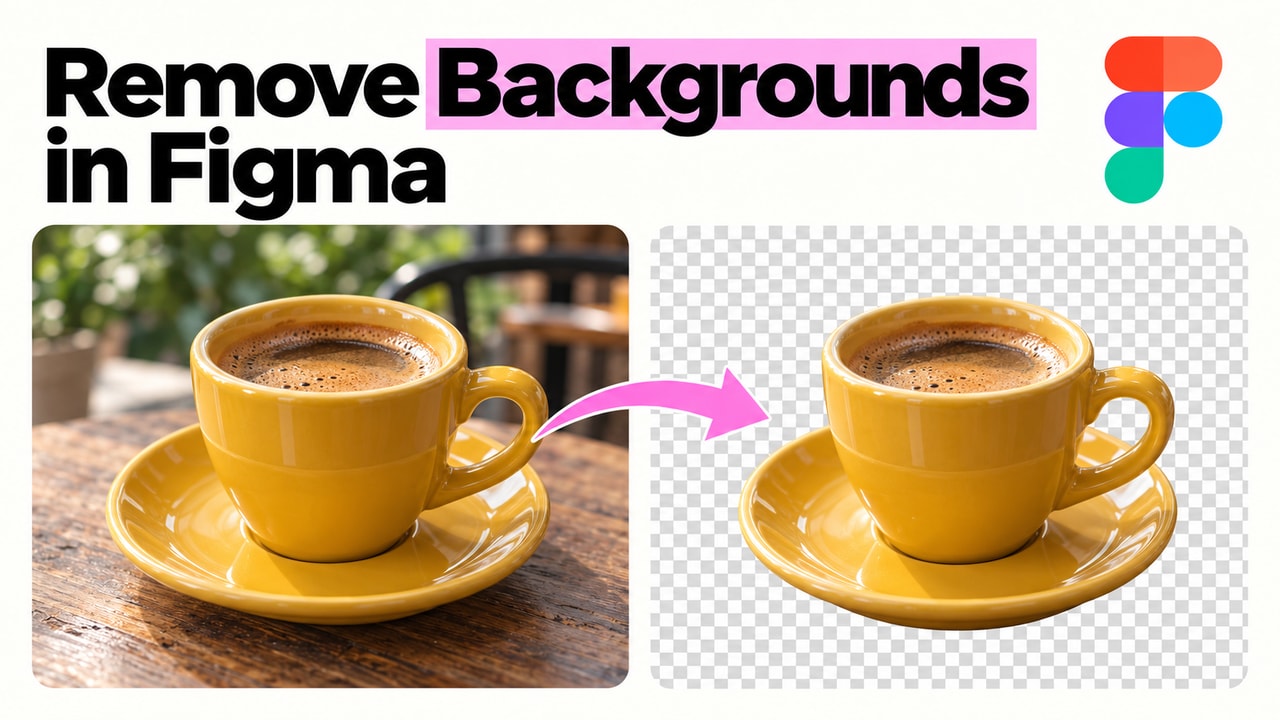
Remove image backgrounds locally, inside Figma.
Turn photos into transparent cutouts without uploading them to a background removal service. TinyImage runs the model entirely on your device, then lets you insert the result into Figma or download a transparent PNG.
Free to install. Includes 10 Pro trials, no credit card required, and fast human support if you need it.
...a massive lifesaver. Easily shaved 4 hours off of my work today. Thanks!

Used by teams at world-class companies



















In practice
Put Remove background
into your existing process.
Prepare a subject for a new background without moving the image through an external service. Work on the cutout in the same Editor as your other photo adjustments.
 TinyImage Pro
 Keep the subject. Choose its next background in Figma.
Background removal keeps the image dimensions and soft transparency. Automatic processing prefers GPU acceleration when available, with CPU processing as a fallback. Inspect hair, fur and thin edges before inserting the result; this tool has no manual mask correction controls. Undo or History restores the previous image and edits. Download PNG to retain transparency.
Read the feature guide- Start with
- A photo from a selected Figma layer or your computer
- Finish with
- An image with a transparent background in Figma or a PNG download
- Best for
- Designers preparing product photos, portraits and campaign cutouts in Figma
- Available in
- TinyImage Pro for Figma Design
Common questions
What to know before you start.
A quick look at what you need, what Remove background produces, and how to try it.
What do I need to use Remove background?
Start with a photo from a selected Figma layer or your computer. In TinyImage, you can follow the feature guide and open the editor, choose a selected figma image layer or an image from your computer, then select local ai and remove background.
What will Remove background produce?
You will finish with an image with a transparent background in Figma or a PNG download. The final step is to review the cutout edges, then insert the image into figma, replace its fill or download a png to preserve transparency.
Can I try Remove background before upgrading?
Yes. Install TinyImage from the Figma Community to get 10 free Pro trials. You do not need a credit card.
Does background removal upload my photos anywhere?
No. TinyImage automatically downloads the model on first use, then processes the image entirely on your device. Photos are not uploaded to the model host or a third-party background removal service. The model remains available while the plugin is open.
How do I keep the transparent background?
Insert the cutout into Figma or download it as PNG. JPEG does not preserve transparency. Background removal keeps the original image dimensions and soft edges.
Can I correct the mask manually?
There are no manual mask correction controls for background removal. Review hair, fur and thin edges before using the cutout. You can use Undo or History to restore the previous image and try another source or processing setting.
Keep exploring
Finish more of the job
with TinyImage.
Explore two more TinyImage Pro features that keep the work moving from Figma to delivery.

Free to install
Try this workflow on your own Figma file.
Install TinyImage free and use the 10 included Pro trials before deciding whether it belongs in your production stack. No credit card required.


 Download PDF quote ↗