













 Español
 Français
 日本語
 한국어
 Polski
 Português

Move files in and out of Figma.
Skip the layer-by-layer rebuild.
Move supported layers between Figma, Adobe apps, Sketch, Canva, Penpot and Procreate. Join 546,000+ Figma users.
Get Pro from $42/month 30‑day money‑back guarantee • Cancel anytime






Move designs between Figma and other design formats faster, without recreating files layer by layer every time a workflow changes. Process conversions on your own computer instead of handing files to another cloud tool, which is a much safer fit for sensitive design work. Import Adobe XD work into Figma more smoothly and reduce the pain of switching tools when teams are consolidating around one platform. Pull older Illustrator, Photoshop, InDesign, and similar files into Figma faster, so valuable designs do not stay trapped in yesterday’s formats. Drop MP4 videos into Figma as animated GIF layers, so demos and motion content are easier to place in your designs. Turn raster artwork into sharper SVG style paths and get more flexible vector assets back into your workflow when you need them. Move designs between Figma and the tools around it faster, and rescue legacy files without rebuilding everything by hand with Convertify.
Thanks so much, Adam!... saved me many, many hours of manual work.

-
 No more rebuilding files by hand between design tools.
-
 Export Adobe, Sketch, Canva, Penpot, Procreate, PowerPoint, Word, DXF and EPS files.
-
 Import Adobe, Penpot, Affinity, Procreate, Office, PDF, SVG, DXF and EMF/WMF files.
-
 Export selected frames or pages, with format-specific options and conversion warnings.
-
 Convert local design files on your computer without a cloud conversion upload.
-
 Get help from a real person — customer support replies within 24 hours.
Used by teams at world-class companies


















Bring the files across without rebuilding everything.
Convert supported text, layers, components and styles so you can keep working on the design.
| Current process |  With Convertify |
|---|---|
| Get a flattened image instead of editable layers The file looks like the design, but the text and artwork are flattened into an image you cannot edit. | Keep supported text, shapes and layers editable. Choose the supported import or export format and retain editable text, shapes and structure where that format allows. Figma file converter |
| Rebuild the components and styles Recreate the components, colours and text styles, then organize them again in the new file. | Bring supported components and styles across. Use XD import and design-system conversion for supported typography, colours and components; check the destination before replacing the original. Adobe XD to Figma migration |
| Upload the design to convert it An upload-based converter moves the source file outside the design environment before returning an output. | Convert supported files locally in Figma. Convertify’s local conversion workflow processes supported files without a cloud upload and downloads the result directly. Local Figma file conversion |
| Redraw the artwork for the next tool Redraw the artwork, put the layers back together for animation or convert the media in a separate app. | Convert the artwork for the next step. Use supported layered motion handoffs, convert video to GIF layers or vectorize supported images to editable paths from the plugin. Figma to After Effects |
10 free Pro trials included. No credit card required.
Try Convertify on your own fileOne click. No layer-by-layer rebuild.
Stop spending days rebuilding the same designs across different tools and formats. Convert them in one click.


| Sketch | Figma |
|---|---|
| Original | Converted |
Example of a Figma file automatically converted to a sketch file using the Convertify plugin
Move the design.
Keep the useful layers.
Migrate legacy design libraries, bring editable business documents into Figma, and hand finished creative to Canva or motion teams without rebuilding it layer by layer.
Move designs between Figma, Adobe tools and other design apps.
Move supported layers between Figma, Photoshop, Illustrator, InDesign and XD, or hand off work to Sketch, Canva, Penpot and Procreate. Export Office documents and other supported formats when your workflow needs them. Review Beta limitations in the format guides.
- Adobe apps
- Sketch + Canva
- Penpot + Procreate
- Editable design layers
Convert local design files without uploading them.
Local file imports and exports are processed on your computer, without uploading design files to a conversion server. Licensing, usage reporting and asset downloads use network connections; Google Docs and Sheets imports also retrieve online content. See our security docs for details.
Explore Local Figma file conversion Bring Adobe XD projects into Figma without starting over.
Drop an XD file into Convertify to import supported layers, styles, components and prototype links. Check fonts and layout before continuing your work in Figma.
Explore Adobe XD to Figma migration Preserve supported components and styles across conversions.
Sketch and XD workflows preserve supported components, color and text styles, and prototype links. Penpot supports editable pages, local components and supported library and variable bindings. Unsupported properties can differ; review warnings and compare the result.
Explore Design-system file migration 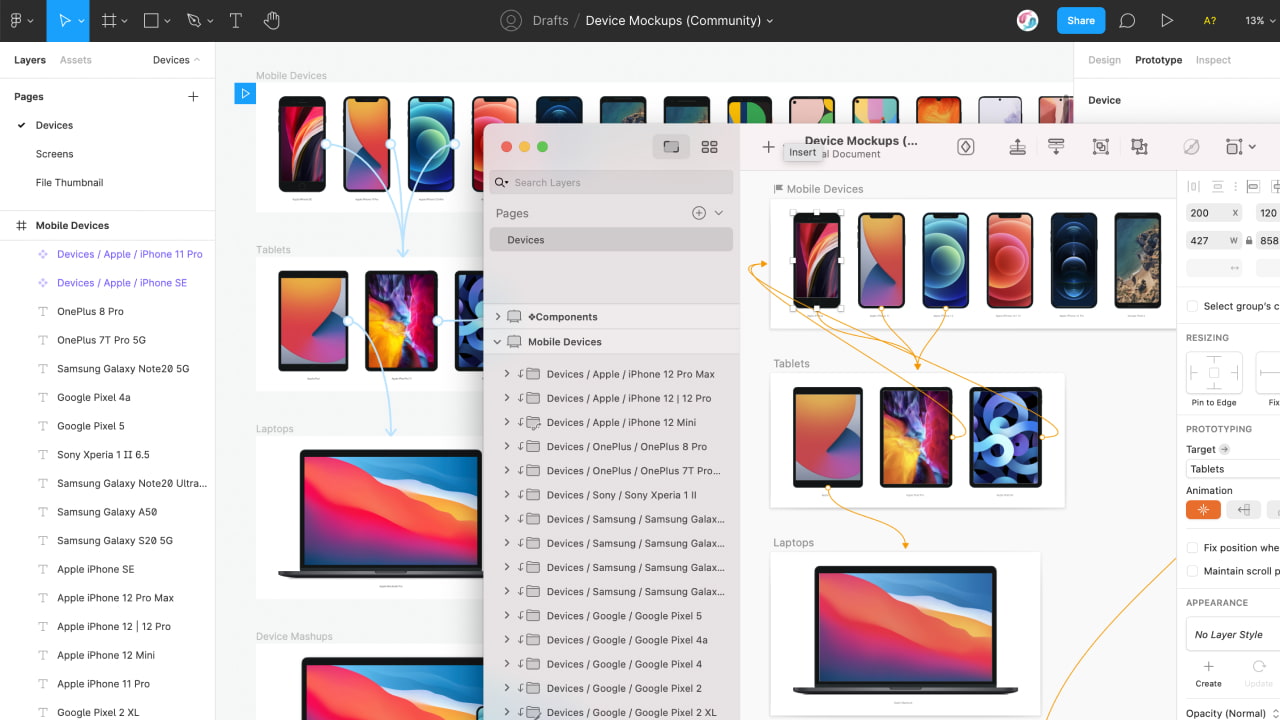
Move Figma designs into After Effects for animation.
Export Figma artboards as an XD file, open it in Adobe XD, then use Adobe XD’s After Effects export to continue your motion work.
Explore Figma to After Effects 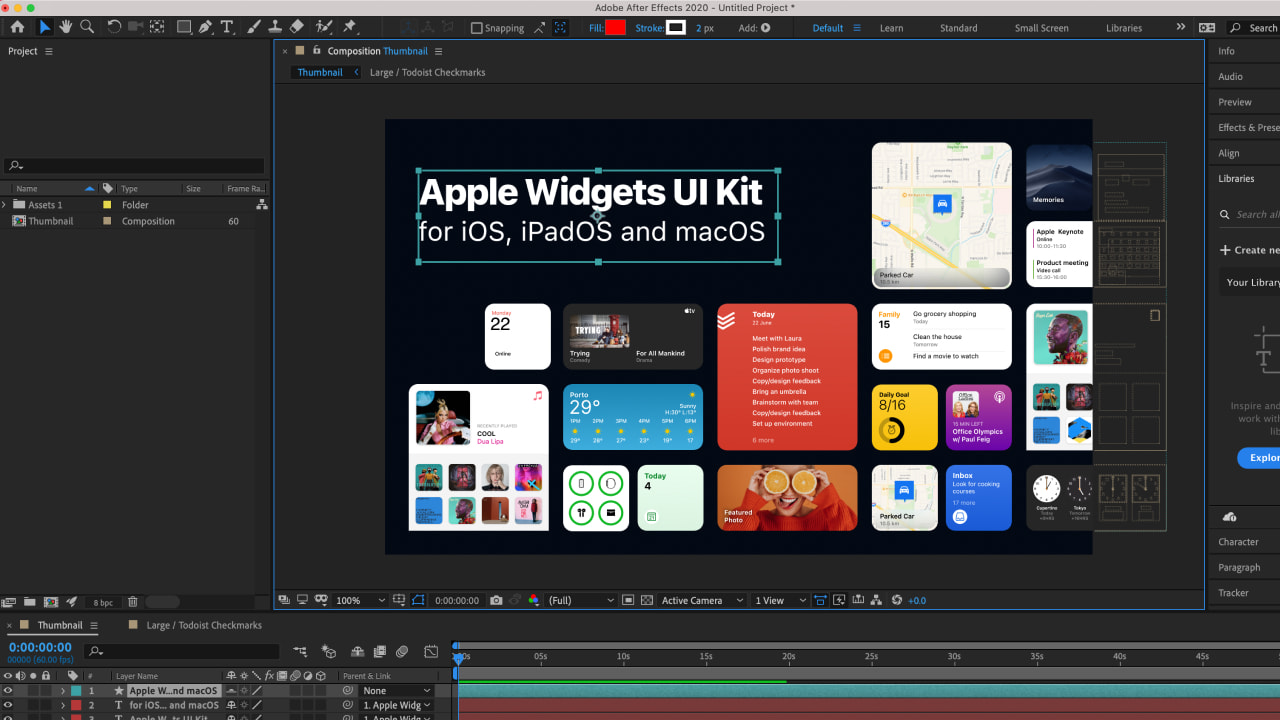
Turn legacy creative and business documents into usable Figma layers.
Import Illustrator, Photoshop, InDesign, PDF, PowerPoint, Word, Google Docs, and Google Sheets content instead of tracing or rebuilding it. Convert supported PDF text into native editable Figma text layers, or bring Lottie files in as animated GIF layers.
- Editable PDF text
- Google Docs + Sheets
- Office files
- Lottie animations
Turn MP4 videos into animated GIF layers in Figma.
Bring your designs to life with animated content. Drop MP4 videos directly into Figma as animated GIF layers. Perfect for product demos, testimonials, and engaging presentations.
Explore MP4 to GIF layers in Figma Turn JPG and PNG images into scalable SVG paths.
Turn pixel-based images into crisp, editable vectors. Upload JPG, PNG, or WebP files and get back scalable SVG layers you can customize, recolor, and resize infinitely.
Explore Image-to-SVG vectorization Which formats can you convert?
Adobe options, design tools, documents and more — in the direction each workflow supports.
Stop rebuilding files by hand.
Try it for 30 days. Not getting value? We’ll refund you in full.
Billing cycle



Start Free
Try Convertify Pro first
$ 0 Includes
10 Free Pro Trials
-
 1 User Enough to test the Pro workflow yourself.
- Try All Pro Features Includes 10 full Pro trial runs.
- Limited Features Free workflow stays available after trials.
- Self-Serve Support Help Docs for setup and troubleshooting.
- Unlimited EPS Exports
- No Credit Card Required Install from Figma and start testing.

Free Trial
No Credit Card Required
Most Popular
Convertify Pro
Figma Plugin License
$49 per month You save $89 yearly
$ 42 Per User
Per Month, billed yearly
Move files without rebuilding every layer 30-day money-back guarantee Support within 24 hours
Thanks so much, Adam!... saved me many, many hours of manual work.
- 1 User Scale the license count before checkout.
- Access All Features Everything in Convertify Pro is unlocked.
- Customer Support Included We'll resolve any issue within 24 hours.
- All Supported Formats
- Unlimited Exports
- Unlimited Imports
- Billed Yearly Save 15% and cancel anytime.
Using multiple plugins? Compare all 12 plugins in the Pro Bundle and save more than buying separate licenses.

Secure Checkout
All prices in USD (ex. Sales Tax)
Best Value

Pro Bundle
All 12 plugins · $339/mo separately
$99 per month You save $ 189 yearly
$ 83 Per User
Per Month, billed yearly
30-day money-back guarantee Secure checkout Support within 24 hours
- 1 User One bundle seat per Figma user.
- One License For 12 Plugins Emailify, Bannerify, TinyImage and more.
- Customer Support Included One support path for the full plugin stack.
- Save 70% with a Pro Bundle Lower than individual plugin licenses.
- Access All Features Full Pro access in every included plugin.
- Billed Yearly Save 15% and cancel anytime.
Secure Checkout
All prices in USD (ex. Sales Tax)
 PDF quote ↗
After you buy
Your license key arrives straight away to share with the Figma users on your team. You have 30 days to change your mind, and you can cancel whenever you like.
- After checkout
License Key, Emailed Instantly.
Upgrade in minutes — your license key arrives immediately.
- Days 1–30
Try It Risk-Free for 30 Days.
Get a full refund if you don’t see value within your first 30 days.
- Any time
Cancel Anytime, Hassle-Free.
No contracts. No hidden fees — cancel anytime with a single click.
Need to convince your boss?
Personalize this message and get a fast “yes” for Convertify. Fast, human support is included, and every purchase is covered by our 30-day refund policy.

Convertify FAQ
Please check out the Convertify Docs for more answers.

Can I try out Convertify Pro?
Yes! 10 free trials of Convertify Pro are included, then you can continue using the Free version of Convertify forever, or upgrade to continue using all the extra Pro features.
What's the refund period for Convertify?
We really want you to get value from using Convertify! If you don't see value within the first 30 days, please contact us for a full refund.

Where can I read about security?
Convertify is designed to be privacy and security focused — for details about security and how the plugin works, please visit security page on our documentation site.

What is Convertify?
Convertify is a Figma plugin for moving designs between Figma and other design or document formats.
Can Convertify import editable documents and tables?
Yes. Convertify can import supported PDF text as editable Figma text, plus content from Word, PowerPoint, Google Docs, and Google Sheets.
Is Convertify a Figma plugin?
Yes. Convertify imports and exports supported formats from inside Figma.
Will Convertify perfectly convert every file?
No. Fonts, effects, masks and layout can differ between formats. Review conversion warnings and compare the result in the destination app, especially for Beta workflows.
Which workflows can Convertify help with?
Convertify supports Adobe, Sketch, Canva, Penpot, Procreate, Affinity import, Office documents, PDF, SVG, DXF, EMF/WMF, Google Docs and Sheets, image tracing, GIF conversion and 3D image workflows. The supported direction varies by format.
Will converted files stay fully editable?
Supported text, vectors and structure remain editable where the format allows. Procreate uses pixel layers; GIF and 3D imports are images, and effects or unsupported content may use image fallbacks.
Can Convertify import files into Figma?
Yes. Convertify can import supported design and document formats into Figma.
 Still stuck? Ask Eva, our AI support assistant. Ask Eva

Useful alongside Convertify.
Spend less time on repetitive tasks.
Get more done with these Figma plugins.